Open Ask AI is an AI-powered Q&A widget for documentation sites. A customizable button component that opens a drawer-style chat interface, designed to be embedded anywhere in your application.
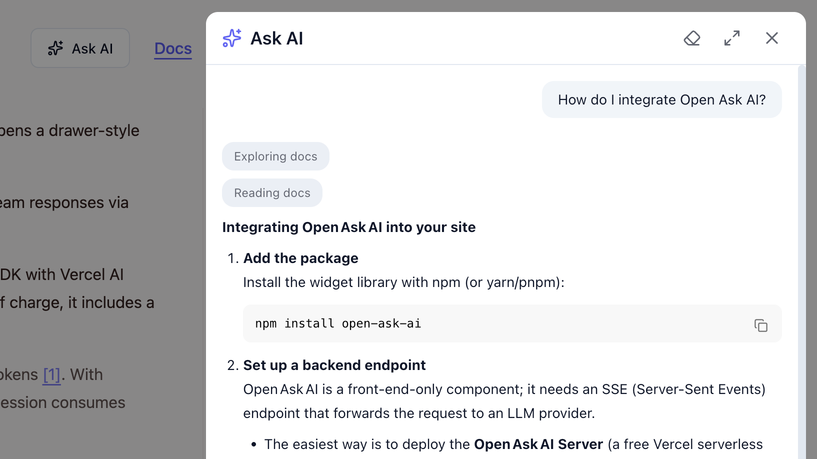
NOTE: this is a frontend-only widget. You need to set up your own backend API to handle AI requests and stream responses via Server-Sent Events (SSE).
Fortunately, setting up the backend is straightforward using the Open Ask AI Server for free. It leverages AI SDK with Vercel AI Gateway and can be deployed to Vercel as a serverless function in minutes. Using Vercel Hobby Plan is free of charge, it includes a generous quota for both hosting and LLM requests.
By default, Open Ask AI Server uses openai/gpt-oss-120b, which charges $0.1/0.5 per 1M input/output tokens [1]. With Vercel Hobby Plan, you get $5 free credit every month, which is enough for 25M tokens. A typical Q&A session consumes less than 5K tokens, so you can have around 5,000 sessions for free every month.
Features
- 🎯 Embeddable Button: A regular button component that can be placed anywhere in your layout (header, sidebar, footer, etc.)
- 🎨 Drawer-style UI: Chat interface appears in a drawer that doesn't block documentation content
- 🌓 Automatic Dark Mode: Detects system and site theme automatically
- 🎨 Customizable Theming: Override styles via CSS variables
- 🌍 Multi-language Support: Customize all UI text through props
- ⌨️ Keyboard Shortcut: Optional hotkey support (e.g., Cmd+K)
- ⚡ Modern Stack: Built with React 19, TypeScript, and AI SDK v6
- 🔄 Stateless: No session management required - continuous chat by sending all messages back to server
Installation
npm install open-ask-aiQuick Start
import { AskAIWidget } from 'open-ask-ai'
import 'open-ask-ai/dist/index.css'

function Header() {
  return (
    <header>
      <nav>
        {/* Your navigation items */}
      </nav>

      {/* Embed the Ask AI button anywhere */}
      <AskAIWidget
        apiUrl="http://localhost:3000/api/stream"
        project="my-docs"
        exampleQuestions={[
          "How do I get started?",
          "What are the key features?"
        ]}
      />
    </header>
  )
}
Configuration
Widget Props
interface WidgetProps {
  // Required
  apiUrl: string                      // Complete URL to SSE stream endpoint (e.g., 'https://example.com/api/stream')

  // Optional
  project?: string                    // Project identifier (sent in request body)

  // UI Configuration
  drawerPosition?: 'right' | 'left'   // Drawer slide direction (default: 'right')
  drawerWidth?: number | string       // Drawer width (default: 600)
  drawerExpandedWidth?: number | string // Expanded drawer width (default: 920)
  theme?: 'light' | 'dark'            // Theme (default: 'light')

  // Content
  texts?: WidgetTexts                 // All UI text labels (see below)
  exampleQuestions?: string[]         // Questions shown in empty state

  // Interaction
  hotkey?: string                     // Keyboard shortcut (e.g., 'cmd+k', 'ctrl+k')
  enableHotkey?: boolean              // Enable/disable hotkey (default: true)

  // Callbacks
  onOpen?: () => void                 // Called when drawer opens
  onClose?: () => void                // Called when drawer closes
  onMessage?: (message: UIMessage) => void
  onError?: (error: Error) => void

  // Styling
  className?: string                  // Additional CSS classes
  style?: React.CSSProperties         // Inline styles (for CSS variables)

  // Custom trigger
  children?: React.ReactElement       // Custom trigger button
}
Customizing Text Labels
All UI text can be customized through the texts prop:
interface WidgetTexts {
  // Button
  triggerButtonText?: string          // Default: "Ask AI"
  triggerButtonAriaLabel?: string     // Default: "Open AI assistant"

  // Drawer
  drawerTitle?: string                // Default: "Ask AI"
  drawerCloseAriaLabel?: string       // Default: "Close"

  // Chat interface
  welcomeMessage?: string
  exampleQuestionsTitle?: string
  inputPlaceholder?: string
  sendButtonAriaLabel?: string

  // Status messages
  emptyResponseText?: string          // Default: "AI 未能生成回复,请重试"
}
Theming
Override CSS variables to customize the appearance:
.ask-ai {
  --ask-ai-primary: #10b981;
  --ask-ai-primary-hover: #059669;
  --ask-ai-font-family: 'Inter', sans-serif;
  /* Add more custom variables as needed */
}
Multi-language Support
<AskAIWidget
  apiUrl="..."
  texts={{
    triggerButtonText: "问 AI",
    drawerTitle: "AI 助手",
    welcomeMessage: "你好!有什么可以帮你的吗?",
    inputPlaceholder: "输入你的问题...",
  }}
/>
Usage Examples
Embed in Header
import { AskAIWidget } from 'open-ask-ai'

function Header() {
  return (
    <header className="flex items-center justify-between">
      <Logo />
      <nav>{/* Navigation items */}</nav>
      <div className="flex items-center gap-2">
        <AskAIWidget apiUrl="http://localhost:3000/api/stream" />
        <ThemeToggle />
      </div>
    </header>
  )
}
Embed in Sidebar
function Sidebar() {
  return (
    <aside>
      <nav>{/* Menu items */}</nav>
      <div className="mt-auto p-4">
        <AskAIWidget
          apiUrl="http://localhost:3000/api/stream"
          drawerPosition="left"
        />
      </div>
    </aside>
  )
}
With Keyboard Shortcut
<AskAIWidget
  apiUrl="http://localhost:3000/api/stream"
  hotkey="cmd+k"          // Cmd+K on Mac, Ctrl+K on Windows/Linux
/>
With Event Callbacks
<AskAIWidget
  apiUrl="http://localhost:3000/api/stream"
  onOpen={() => console.log('AI assistant opened')}
  onClose={() => console.log('AI assistant closed')}
  onMessage={(message) => {
    // Track messages for analytics
    // Extract text from message parts
    const text = message.parts
      .filter(p => p.type === 'text')
      .map(p => p.type === 'text' ? p.text : '')
      .join('');
    analytics.track('ai_message', { role: message.role, text });
  }}
  onError={(error) => {
    // Handle errors
    console.error('AI error:', error)
  }}
/>
With Project Identifier
<AskAIWidget
  apiUrl="http://localhost:3000/api/stream"
  project="my-documentation"  // Sent in request body
/>
Development
# Install dependencies
npm install

# Build
npm run build

# Type check
npm run typecheck
License
MIT